Tuesday, August 21, 2012

Jing: Screen Video Capture

For a little while now, I've wanted to know how to capture video from my computer screen. If you click the "Print Screen" button on your PC, you can get a picture of your screen and then paste it into a program. But, I've seen several companies make tutorials and introductions while recording what they are doing on their screen. I wanted to figure out how to do that.

So, I asked some of my colleagues and they mentioned Camtasia. This software allows you to capture video from your computer screen, and then edit it inside Camtasia. The only problem is that you have to purchase this software. The good news is that there is a free trial available from the website.

But, there is even better news. The same people that make Camtasia also offer Jing. Jing only allows you to create 5 minute videos, but it is absolutely free =D. The website does want you to make an account, and sign up for the newsletter from TechSmith, the creators. But the software works really well, allows you to capture videos and photos, and then it gives you a link to share with others. Here's a quick video I created, that shows you what it looks like and what it does.

Monday, August 13, 2012

Tic-Tac-Toe Robots and a Demolition Derby

Something that we've done a couple summers in a row now is LEGO Robots. Mr. B is a local programmer, and he has fiddled with LEGO Mindstorms NXT Robots in his spare time. He has been good enough to develop a couple programs that he started presenting at the Hayden Library each summer, and the programs have spread to a couple other local libraries as well =D

With the success of the LEGO Robots program we had our first summer, we have expanded it to two programs, each presented two times in the same day. The two programs this year were "What is a Robot? with Demolition Derby" and "What is Binary? with Tic-Tac-Toe Robot."

Each program started with a powerpoint that gave a brief overview of the topic, and then the participants had a chance to assemble the robots and see how they worked. During the Demolition Derby, four robots scored points by activating touch sensors on the other machines, and during the Tic-Tac-Toe, two LEGO brains were attached to a LEGO crane that would move your pieces to where you wanted them. Mr. B had programmed the robots ahead of time (it takes a long time to work it all out), and they worked like a charm.

In addition to the fun of seeing LEGO Robots do things on their own, the participants had a chance to learn more about the computer technology that surrounds them. 

These programs are hugely popular because the robots themselves are amazing, and because Mr. B does a great job putting them together. Thanks!

If you would like to know more, you can visit Mr. B's website, legomyrobo.com.


Monday, August 6, 2012

Zombie Prom!

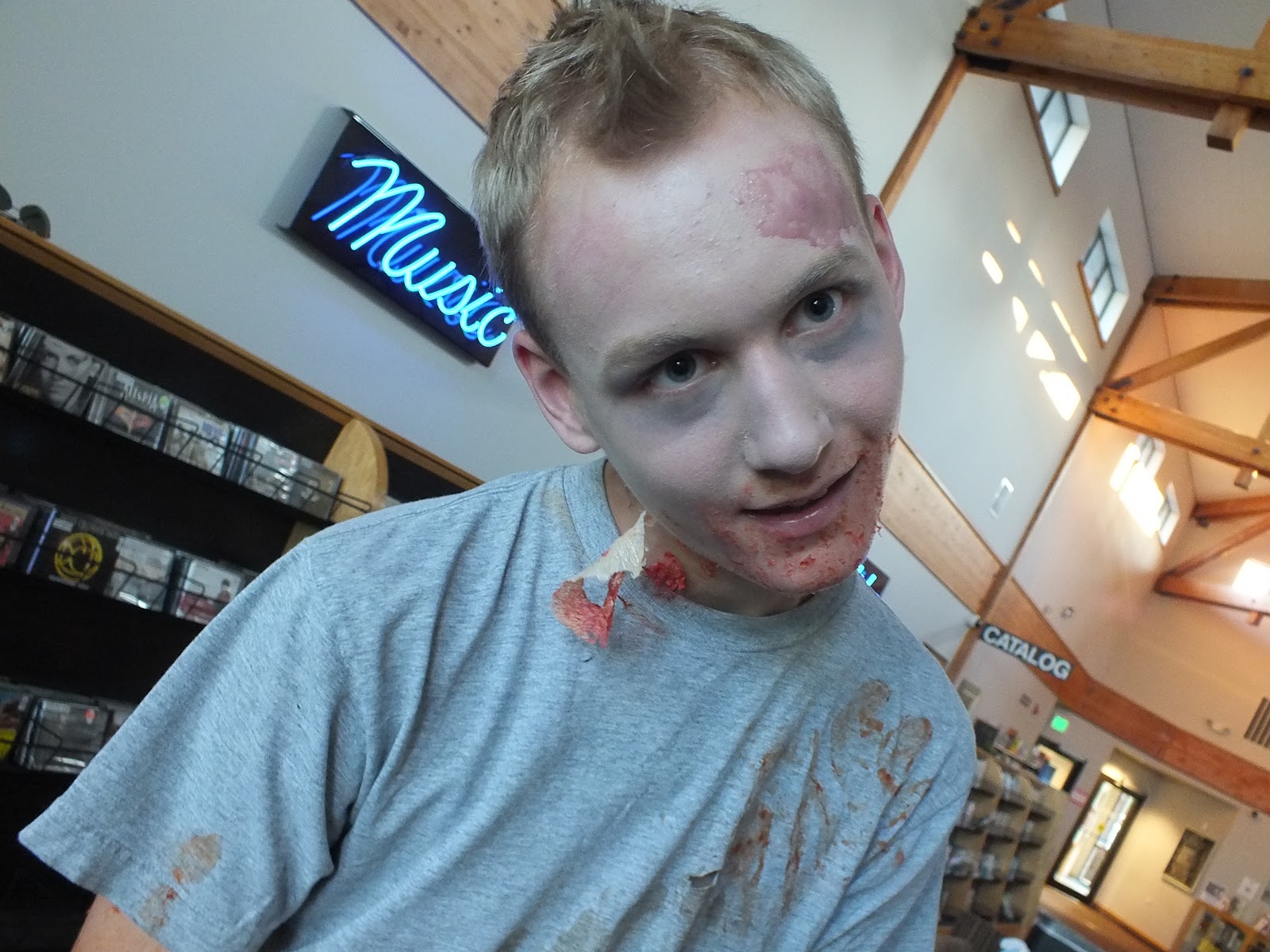
On a Saturday night after the library closed, a rare strain morphed teenaged patrons into brain-eating, make-up put oning, Thriller dancing zombies!

As everyone knows, zombies eat brains because they don't have any of their own, and a delicious way to do this is Jell-O. I took some foil, creased and folded it into a brain looking shape, and put it into a muffin tin. Just add some Jiggler recipe style Jell-O, and you're set.

Adding some red food coloring to pink lemonade makes a tasty blood juice, and dipping pretzel rods into melted chocolate with some almond bark at the ends make for some edible fingers =D

After some munching it was time to zombify ourselves! There were five effects we went for: whited-out faces, dark eyes, rotting flesh, messed-up hair, and blood.

If you buy some Ivory colored foundation and some dark eye shadow, you get some deathly looking skin with sunken eyes. For girls, tease your hair out, and for guys, mess it up!


You can do rotting flesh two different ways. Mix about equal parts of flour and corn syrup into a sticky paste, put it on your skin, and then press some toilet paper onto it. This becomes a "skin" you can tear, and also looks like rotting skin.

Another way to get the rotting skin look is to mix up flour, corn syrup, corn starch, and water, and apply it to your skin. Mix in the different ingredients until it starts to clump onto your skin. Start with your corn starch and if it's too runny, add some flour, or if it's too sticky, add some corn syrup.

Once you have all this "make-up" applied, add a generous amount of blood. You can mix corn syrup and flour (about two parts corn syrup to one part flour) with one drop blue food coloring and a lot of red food coloring to make a smearing, purplish blood, or use tomato paste for a clumping, red blood.

It wouldn't be much of a prom without dancing, and we thought Michael Jackson's "Thriller" would be appropriate. There is a whole series of YouTube videos that breaks down the dance step by step, and we used that to acquaint everyone with some zombie moves =D

This program was way too much fun and works well with the Summer Reading theme "Own the Night" and the upcoming Teen Read Week theme "It Came From the Library."

Tuesday, July 31, 2012

Glogster: Create Interactive Posters

Once again, my SPLAT homies have put me onto a cool site for all of you =D They mentioned this site a couple months ago, but I forgot the name of it. Then, they mentioned it again this last time we had our quarterly meeting, so I figure I'll do a post on it so I don't forget again hehe.

The site is Glogster, and its another one of those social media like thingys. This network focuses on creating interactive posters called Glogs (Graphic Blogs), combining pictures, text, videos, and graphics into your own creation.

Like most of the social media entities, this does require creating a free account. Glogster seems to promote its connectivity to video and photo sites (like Youtube and Flickr), and then the sharing feature for all your other social networks (Facebook, Twitter, and the like).

For educators, there is also a Glogster EDU that has recently been launched to offer private classroom management of multiple Glogster accounts. Just so you know, these ones cost money.

So if you make a lot of posters, I thought that this might be a cool alternative to the traditional stuff. 

Monday, July 30, 2012

Creepy Scavenger Hunt =D

So the theme "Own the Night" made me think of creepy and darkness, so I thought we'd do a creepy scavenger hunt. I came up with some clues and activities, put the kids in teams of 2 or 3, and let them go at it.

In addition to a fun program, some of my questions leaned toward literacy. These questions looked like finding a book, or finding a piece of information. This was an awesome opportunity to see how much the kids knew about finding things in the library, and filling in the blanks of how to find something if they weren't very familiar with it.

If you wanted to make the program a little creepier, it would be more fun to do this at night, in a darker library, and have some creepy decorations going on. 

All in all it was a great program, and if you were wondering what my questions linked like, here is a list for you =D

What is the theme for this year's Teen Summer Reading?

One of the horror books that Rick Yancey wrote is titled...

Create your own ghost (using paper towels and a sharpie), and use it to decorate the Young Adult Section

Write down what is hidden inside the slime. (I used some cornstarch, water, and green food coloring to make my slime, and hid a plastic bug in it)

Do the solar system puzzle. (Not exactly creepy, but the kids had a fun time doing it. I originally thought of each team having to do the puzzle individually, but I thought it would take to long. So instead, I had all of the kids built it together to start the program)

Find a creepy book and write the title here

Who wrote The Monstrous Memoirs of a Mighty McFearless?

Find a creepy movie and write the title here

Find 5 creepy crawlies and right down where you found them. (I placed 10 plastic bugs across the library, just in case a few were too hard to find in a short time)

Do the Creepy Words Word Search Puzzle

Do a creepy face and have your librarian take a picture of it


Wednesday, July 25, 2012

A Step from Heaven?

A Step from Heaven by An Na

Why did I read it?

This was one of the books for my Diversity in Children's Literature class, and it also won the 2002 Michael L. Printz Award.

What happened?

Young Ju doesn't know what Mi Gook means, but she is pretty sure it means heaven. Her friend tells her that she won't be coming back once she goes there, and every time her struggling Apa (father) and Uhmma (mother) say the word, they associate it with a better place, and happiness. It can even make her Apa stop hitting her Uhmma. But, it turns out that Mi Gook isn't heaven at all. Its really a place called Ah-me-ri-ka.

Its a place where Young has to have her hair in curls, her mother and father still struggle, they live in a small house, and Halmoni (grandma) isn't around anymore because she is still in Korea.

As Young Ju starts going to school and church, she begins to find a balance between her Korean heritage, and her new American home. If only her family didn't make it such a confusing balancing act...

What did I like or not like?

This novel has a very interesting writing style. In an interview, the author mentions that she wanted to realistically portray childhood experiences, and she thought that was better portrayed in small instances and memories instead of a coherent narrative.

She writes, "Memory doesn't come as a complete story with a beginning, middle, and end, but rather lives in moments that focus on a smell or a touch or a feeling." This made the novel almost read like poetry, and was very cool.

In addition to this fascinating writing style, this novel does a great job portraying the struggle that Young Ju has between staying true to her heritage, and living in her new home. It also realistically portrays the struggle of loving her family, while they are often very difficult to love.

While this isn't a necessarily enjoyable novel to read, it is a powerful story, and I'm glad I read it.